How to Get a 100% SEO Title Score on YouTube: Without SEO vs With SEO (Step by Step)
**Introduction: Why does your title matter so much?
You work hard on a video, upload it, and the views stop at 3 or 4. Very often the problem isn't the video. It's the title.
YouTube can't watch your video. It reads your words first. Your title tells YouTube what the video is about and which searches to show it in. Viewers also read the title before they decide to click or scroll past.
In this article you will learn:
- The real difference between a title without SEO and a title with SEO
- 7 easy steps to get a 100% SEO title score
- How to check and improve your title score on TubeMentorPro
One thing first: a 100% score means your title follows all the SEO rules. No tool can guarantee views, but a good title gives your video the best chance to reach the right people.
You work hard on a video, upload it, and the views stop at 3 or 4. Very often the problem isn't the video. It's the title.
YouTube can't watch your video. It reads your words first. Your title tells YouTube what the video is about and which searches to show it in. Viewers also read the title before they decide to click or scroll past.
In this article you will learn:
- The real difference between a title without SEO and a title with SEO
- 7 easy steps to get a 100% SEO title score
- How to check and improve your title score on TubeMentorPro
One thing first: a 100% score means your title follows all the SEO rules. No tool can guarantee views, but a good title gives your video the best chance to reach the right people.
Without SEO vs With SEO: the difference at a glance
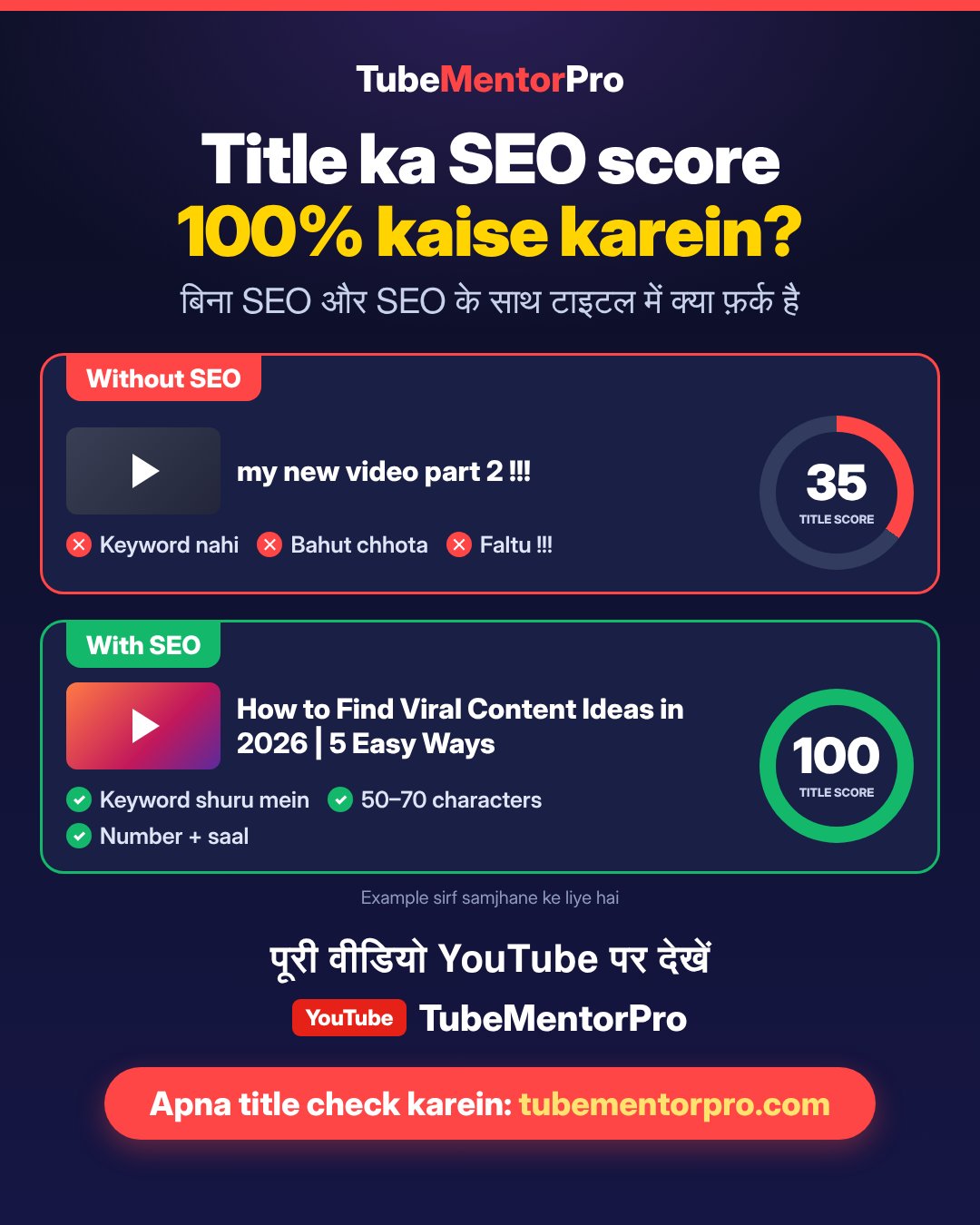
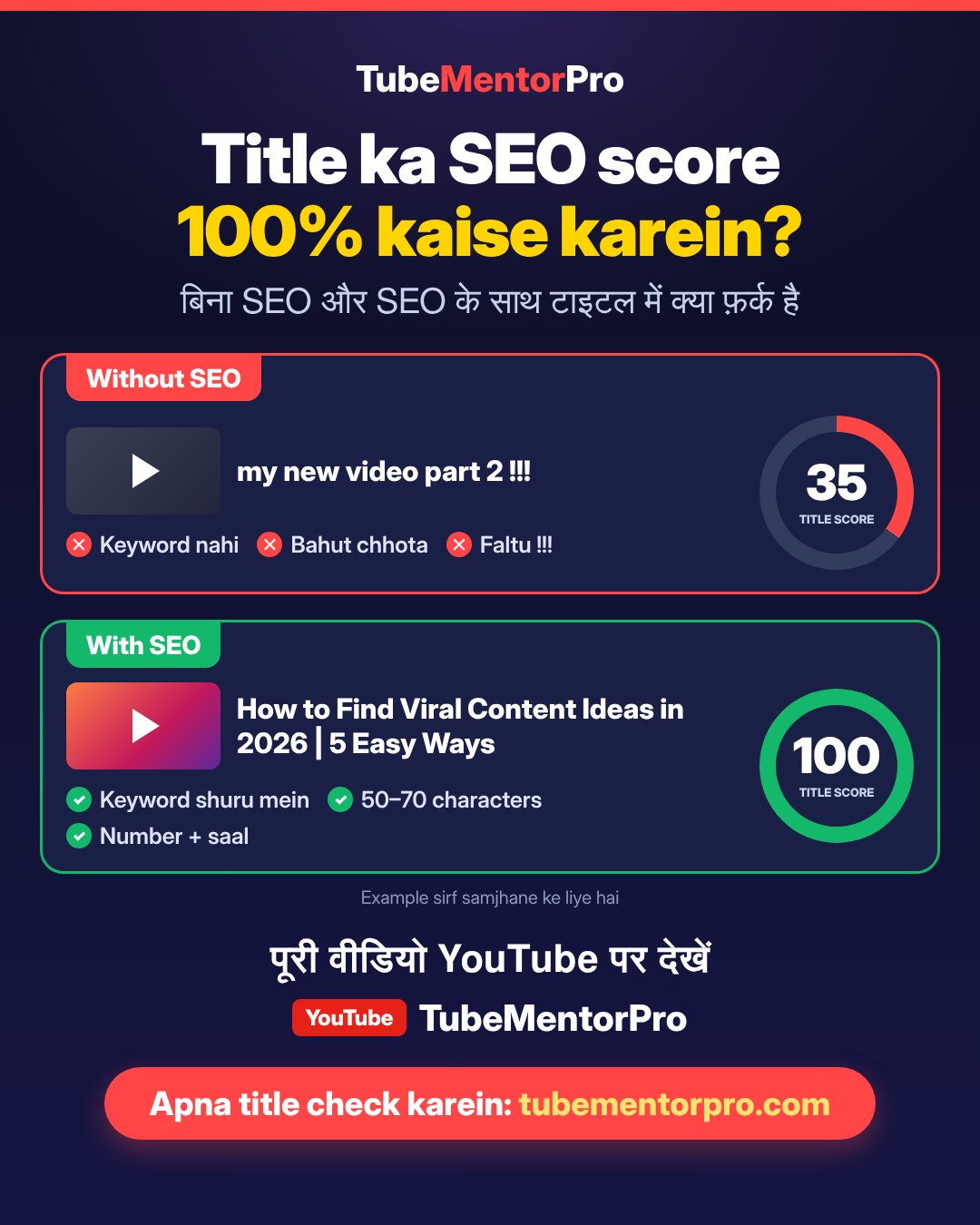
Look at these two titles. They could be for the same kind of video, but to YouTube and to viewers they are worlds apart.
Without SEO: my new video part 2 !!!
With SEO: How to Find Viral Content Ideas in 2026 | 5 Easy Ways
1. Keyword
Without SEO: no keyword, so YouTube can't tell what the video is about.
With SEO: "Viral Content Ideas" at the start, which is what people search for.
2. Length
Without SEO: 23 characters, too short.
With SEO: 53 characters, complete and clear.
3. Benefit
Without SEO: doesn't say what the viewer gets.
With SEO: "5 Easy Ways" tells them exactly what they'll learn.
4. Number and year
Without SEO: none.
With SEO: "2026" and "5" make the title feel fresh and specific.
5. Symbols
Without SEO: "!!!" makes it look like spam.
With SEO: clean, with just one "|" as a separator.
Example score: Without SEO 35/100, With SEO 100/100.
These scores are examples to explain the idea. You can check the real score of your own title on TubeMentorPro (see the steps below).
7 steps to a 100% SEO title score
Each step has a short example. Follow them in order.
Step 1: Find the right keyword
A keyword is what people type into YouTube search. Type the first word of your topic into the YouTube search box and look at the suggestions that appear. Those are things people are actually searching for.
Example: typing "content ideas" suggests "content ideas for youtube" or "viral content ideas". Pick one of these.
Step 2: Put the keyword at the start of the title
YouTube and viewers both read the first words first. On mobile, long titles get cut off, so the important part should come first.
- Weak: "Today I will tell you about viral content ideas"
- Better: "Viral Content Ideas: How to Find Them"
Step 3: Keep it between 50 and 70 characters
YouTube allows titles up to 100 characters, but search results and mobile usually show only the first 60 to 70. A very short title says nothing, and a very long one gets cut off.
- Too short: "New video" (9 characters)
- Right: "How to Find Viral Content Ideas in 2026 | 5 Easy Ways" (53 characters)
Step 4: Tell the viewer what they'll get
After reading the title, the viewer should know what they'll gain. Words like "How to", "Easy way" and "Step by Step" make the benefit clear.
- Weak: "My YouTube channel"
- Better: "How to Grow Your YouTube Channel (Step by Step)"
Step 5: Add a number or the year
A number makes the title specific and easy to understand. The year shows the information is current.
- "5 Easy Ways", "7 Steps", "2026"
Only write what's true: if your video has 5 tips, write "5", not "10".
Step 6: Avoid anything that looks like spam
These make a title weak and hard to trust:
- Lots of symbols: "!!!", "???"
- The whole title in CAPITALS
- A false promise (clickbait) the video doesn't deliver
- Repeating the same keyword again and again
Using capitals on one word for emphasis is fine, like "100% SEO Score".
Step 7: Match the title with your description and tags
Use the same keyword from your title in the first 1-2 lines of the description and in your tags. This makes it clear to YouTube that the video really is about this topic. Write the title in the language your viewers search in (English, Hindi or Urdu).
How to check your title score on TubeMentorPro
Remembering every rule is hard, so TubeMentorPro checks your title for you and shows what's missing.
1. Open tubementorpro.com in your browser.
2. Open the Optimizer from the left menu. You don't need to log in for this.
3. Enter your title (or video) and look at the score. You get separate scores for Title, Description and Tags.
4. For anything shown in red or with a low score, read the tip next to it and fix your title.
5. Want a better title? Log in with Google, open SEO Pro, choose your video, and pick one of the 5 titles written by AI.
6. Paste the new title into your video in YouTube Studio and save.
7. Check again until the score is close to 100.
How the full video SEO score works: Title 40% + Description 30% + Tags 30%. So for the whole video to score 100, the description and tags need to be good too, not just the title.
Mistakes to avoid
- Giving every video the same kind of title ("Part 1", "Part 2" with no topic)
- Copying another channel's title word for word
- Adding a keyword that isn't actually in the video
- Changing the title again and again after upload; fix it once and give the video a few days
Frequently asked questions
Will a 100% title score make my video go viral?
No, nobody can guarantee that. Views also depend on video quality, the thumbnail and what viewers are interested in. A good title helps your video show up in the right searches.
How long should my title be?
50 to 70 characters. If the important part fits in the first 40 characters, it shows in full on mobile too.
Should I write my title in English, Hindi or Urdu?
In whatever language your viewers search in. In Pakistan and India, titles in Roman Urdu or Hindi also get a lot of searches.
Can I change the title of old videos?
Yes. Try improving the titles of videos with low views. After changing a title, wait a few days.
Is checking a title on TubeMentorPro free?
The Optimizer opens without logging in. For AI titles (SEO Pro), you need to log in with Google.
Final words
Your title is the front door to your video. Keyword at the start, 50-70 characters, a clear benefit, one number, and no spam: that's all you need to remember. Then check your score on TubeMentorPro and take it to 100.
Watch the full video on the TubeMentorPro YouTube channel, and check your own title now.